
One vault for everything
I use one vault for my entire digital life.
I self-host Vaultwarden, an open-source server compatible with Bitwarden, on my Mac mini.
It holds my passwords and cards. It also holds the development and production credentials for my applications. My MacBook Pro, Mac mini and Galaxy S25 all connect to it.
There is no password-manager subscription, and the server is reachable through my private Tailscale network. I don't need Google or Samsung to host my passwords.
The part I find most useful is the CLI. The same vault that fills a login on my phone can supply credentials to an app on my Mac.
I can move between machines without copying secret files, and an agent can start an application without asking me to paste a password into the conversation. The workflow belongs to my projects, so I can change agents without moving my credentials to a new provider.
The important detail is how those secrets reach the application. A vault alone is not enough if the next step is writing every secret into a plaintext file.
Passwords across my devices
Vaultwarden is a community implementation of the Bitwarden server API. My devices use Bitwarden clients configured to connect to it.
When I change a password on one device, the other clients can sync the updated vault. The vault data is encrypted on the client. Tailscale provides the private route to the server; it does not replace my vault password or device security.
The server uses hardware I already have, so I pay no password-manager subscription for this setup. I do own the operational work: keeping the Mac available, maintaining the server and having recoverable backups.
One vault for every app
The same vault that holds my logins holds the environment values for my projects. I organize them in a way both a person and a script can understand:
- Folders separate projects.
- Secure notes separate environments, such as local and production.
- Custom fields hold named values. The note body holds instructions for a human.
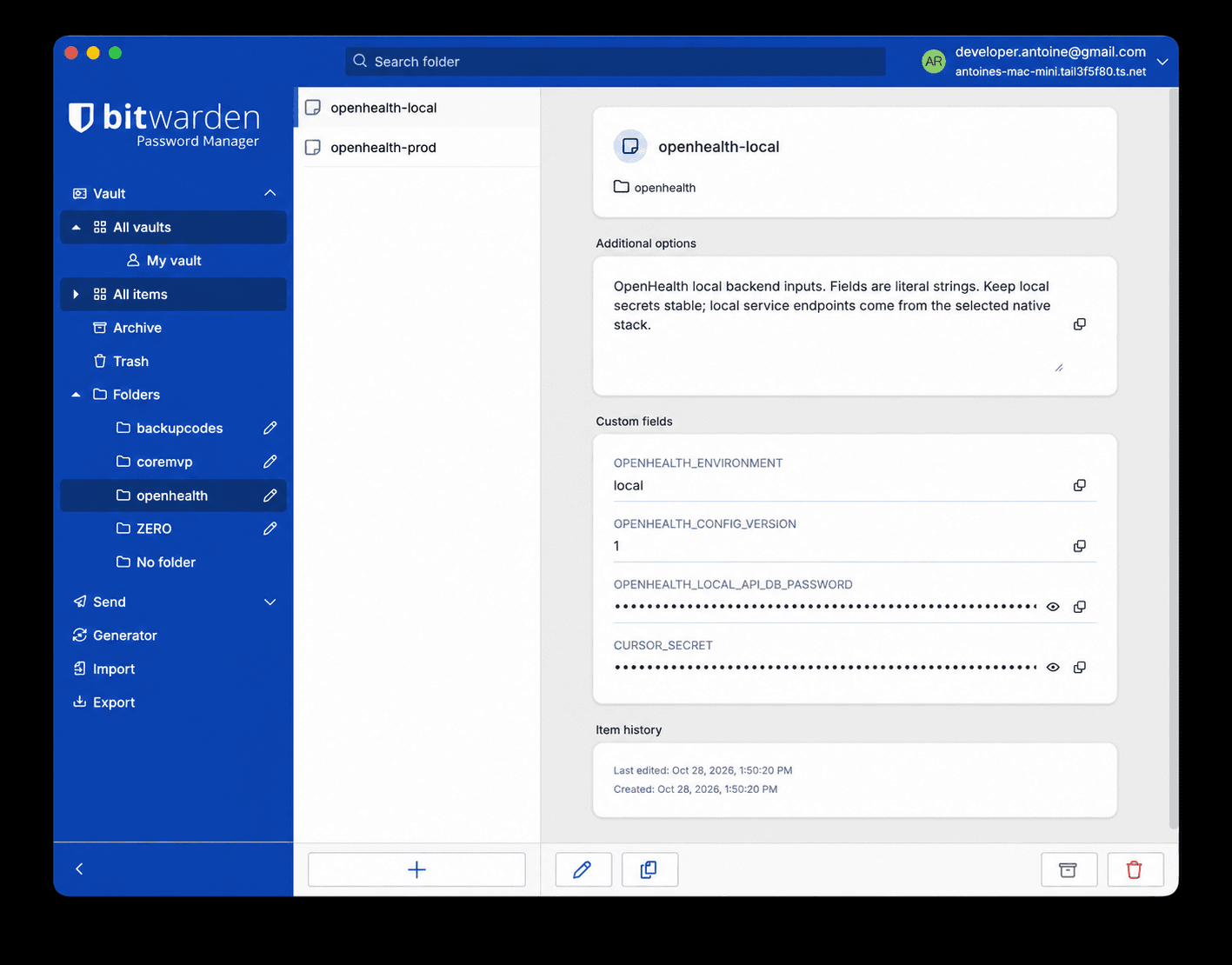
For example, a local item might have APP_ENV as a Text field and POSTGRES_PASSWORD as a Hidden field. Those are illustrative names, not real values. The repository tooling can validate named fields without parsing a block of assignments from a note.
Text and Hidden are display types, not permissions. A trusted process that retrieves the item can access its fields. The guardrails come from what the tooling publishes and passes to each process.
Production values have their own item, but storing a value in the vault is not the same as deploying it. For one production service, I maintain a machine-local copy in macOS Keychain; a launchd wrapper reads it when the service starts. That service does not fetch directly from the vault. Other services retain their own delivery paths.
Changing a password in the vault does not update those copies, rotate it at the service or restart an application.
The vault stays when the agent changes
Agent platforms increasingly offer their own places to store credentials. Codex Cloud's personal vault, for example, supplies values to its cloud environments.
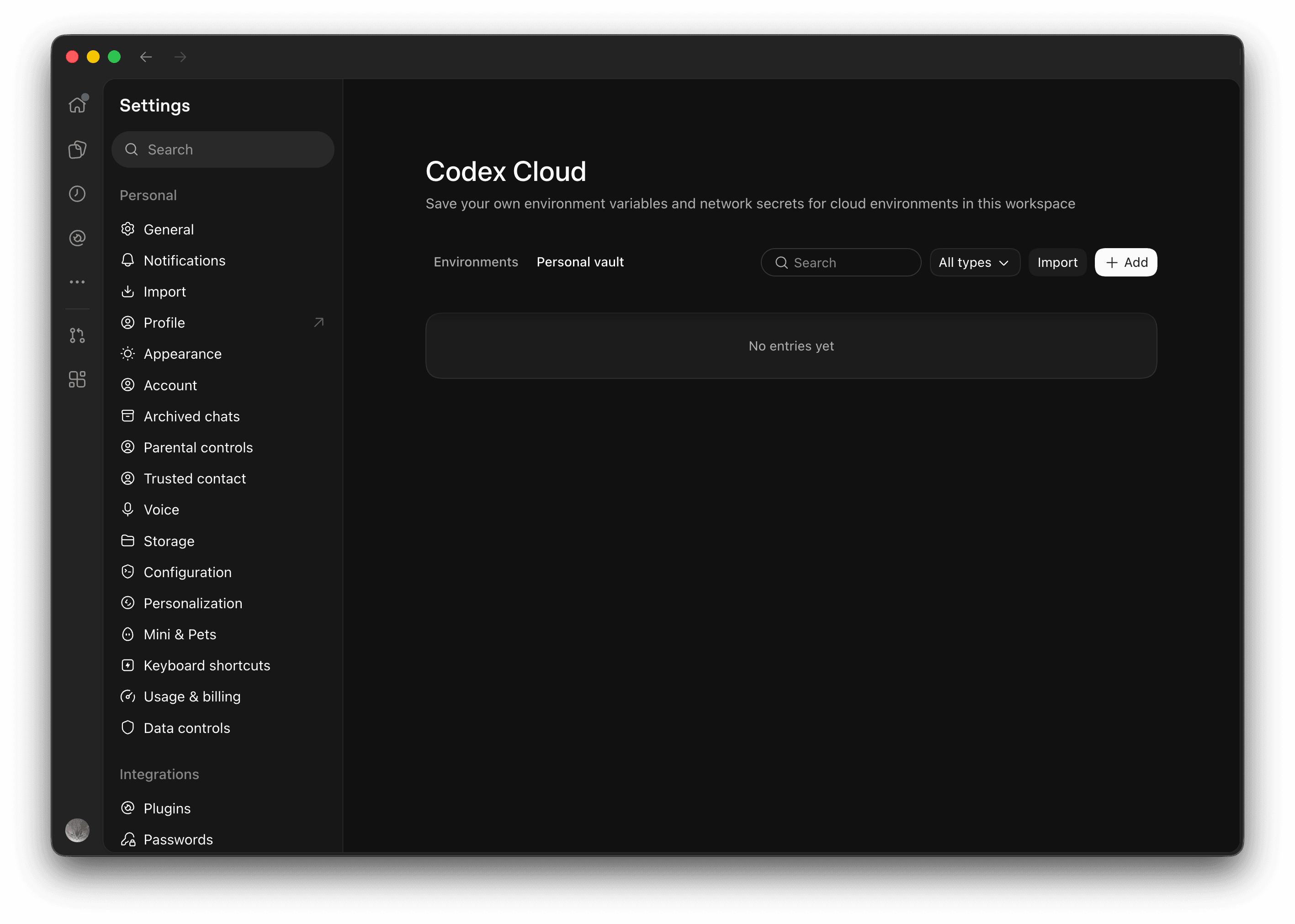
I don't want my application's credentials to live in an agent provider's vault. My projects run on my Macs, from a terminal and through different agents. The company making an agent doesn't need to be the place where I keep my application secrets.
The same question comes up with personal agents. Grok Bot has its own vault for logins and cards, and it can connect to 1Password.
I'd rather connect it to the vault I already host. I'm waiting for an integration that works with self-hosted Vaultwarden, so I can use my own password manager instead of moving everything into another provider's vault.
I want my credentials to follow the project, not the agent. Maintaining them in each provider's settings would mean more copies to update whenever I change tools or rotate a credential.
I chose Vaultwarden because it's open source, I can host it myself, and Bitwarden's clients and CLI work across my devices. The project owns the commands for starting the app; an agent that can run those commands and has the necessary access can use the same workflow. I don't need to put every application password into a new agent's settings first.
My vault stays mine when I switch agents. I choose where it runs, how my projects reach it, and when to update it. My passwords and cards live alongside my application credentials, rather than being split between every provider I use.
That control comes with responsibility: I maintain the server and need recoverable backups. And an agent with enough access to the vault or a credentialed process can still reach secrets. Owning the stack doesn't make those risks disappear; it lets me decide how to handle them.
With the vault in place, the practical question is how an agent uses it without turning me into the person who carries passwords between tools.
How agents work with the vault
Say I ask an agent to investigate a database issue. It needs a running application and a database connection. I want it to get on with the investigation, not stop while I search for a password.
Here's the workflow in one of my projects. ./project stands in for the repository's CLI; the actual command name differs:
./project env sync
./project env list
./project start
Each command has a different job:
- Sync retrieves the vault item and saves only approved, validated ordinary settings.
- List reads those settings without fetching secrets. The agent can check the environment without seeing a database password.
- Start fetches fresh credentials and passes them to the services that need them. The agent can then use the project's supported database tools.
For example, the settings list might show:
APP_ENV='local'
LOG_LEVEL='info'
These are illustrative values. The database password doesn't appear in the list; the start command supplies it to the service instead.
Under the hood, the launcher uses the Bitwarden CLI to sync the vault and retrieve the selected item. It validates the fields, separates approved settings from private inputs, and passes the latter to the application through the launch path. Running bw get item directly can print the whole item, including its secrets, so that isn't the command I want an agent using for a routine check.
The agent still needs the right permissions and a usable vault session or unlock path. But I no longer have to carry credentials between the vault, the terminal and the agent.
I can use the same workflow on either Mac. A plain bun run dev does not fetch credentials automatically; an app that needs them requires an explicit launcher.
Getting secrets out of files
My first delivery path fetched the vault item and wrote a decrypted environment snapshot to disk. It was convenient: shell scripts and Docker Compose could read the same file. It also gave an agent browsing the project a straightforward way to read every secret in that snapshot.
Exporting the whole snapshot let unrelated child processes inherit them. A failed refresh could leave a stale copy behind.
Moving assignments from Notes into named fields made the data easier to validate. It did not solve the exposure while the CLI still wrote every decrypted value to a file.
The new path keeps ordinary settings and secrets separate:
The app gets the secrets it needs when it starts; the CLI does not save a full secret file. Only Text fields with approved names and valid values can be saved as ordinary configuration. Secrets and unknown fields stay out.
For Docker Compose, the launcher fetches fresh inputs and passes them through a pipe to a clean child environment. Existing service mappings decide which container receives each value. Native database and HTTP tools have their own scoped delivery paths.
The trusted fetch still reads the complete vault item before narrowing delivery. Docker also retains container environment information. This is process environment delivery, not Docker Secrets or field-level vault permissions.
When the vault is unavailable
A failed fetch stops a full restart before it stops the running app. The launcher checks the required credentials first and uses the same fresh inputs to start the replacement. If stopping fails, it does not continue to start.
It does not silently fall back to an old secret file. A missing fresh credential cannot be filled from an old inherited environment variable.
Regression tests exercise the delivery and failure paths with synthetic credentials and controlled dependencies. They do not prove live vault migration or production application health.
How I host the vault
Vaultwarden runs in Docker Compose inside Colima on the Mac mini. Its HTTP port binds to 127.0.0.1:8888, not to the local network. Tailscale Serve provides the HTTPS endpoint and proxies requests to that loopback port. The route is available only on my tailnet.
The active vault data lives in a persistent Docker volume. The container uses an unless-stopped restart policy, and the server image is pinned to a version.1 That helps me manage updates, but it does not keep the vault available if the Mac, storage or network is down.
Bitwarden documents how to connect desktop, mobile and CLI clients to a self-hosted server. Running my own server gives me control over where the vault is hosted; it also makes availability and recovery my responsibility.
What an agent can still access
This setup reduces accidental exposure by avoiding a shared plaintext secret file and limiting which processes receive credentials.
It is not a sandbox. An agent that can access the vault, Docker, the host or credentialed code may still be able to retrieve or disclose secrets. Stronger isolation needs a separate host and execution boundary.
Old secret files were not automatically deleted, and passwords were not rotated at their services. Those are separate operations.
For me, that's the useful shift: one place to manage credentials, with a deliberate path from the vault to the process that needs them. I can use the same vault on my phone and across my Macs, while an agent can get to work without turning me into a password courier.
If you're building a similar workflow, start by looking at where your secrets go after they leave the vault. That's where a convenient setup can quietly become an exposed one.
Footnotes
-
In September 2026, a Bitwarden desktop update opened to an empty item list while the CLI still accessed the vault. The server was on Vaultwarden 1.36.0; the existing container had not updated just because its image was tagged
latest. After a full active-volume backup and an upgrade to 1.37.2, the desktop client showed the items again. The release notes describe the client compatibility requirement. That upgrade backup is not proof of a recurring backup or tested restore plan. ↩
About the author
Hi, I'm Antoine. I build AI systems and write about the decisions, failures, and work behind them.